

In April 2025, DeepSeek published a short note on GitHub explaining why it would not open-source its internal inference engine directly. They gave three reasons: the engine was forked from vLLM over a year earlier and heavily modified for their own models; it was tightly coupled to internal cluster management tools; and the team was too small to maintain a large open-source project. Instead, they chose to extract standalone libraries or contribute back to existing open-source projects.
Eighteen months later, on October 20, DeepSeek released the inference framework behind its production service anyway, under the name DeepInfer. The README acknowledgments note that it was originally built primarily on vLLM. On the same day, its companion project deepseek-recipe hit version 0.2.0, and DeepSeek published a deployment walkthrough on Zhihu detailing the full system. The post states that inference code and performance optimizations for future models will continue to be open-sourced in DeepInfer.
This initial release has a narrow scope: it currently supports only DeepSeek-V4.1-Flash (released three days earlier), runs only on two data-center chips—NVIDIA SM100 Blackwell GPUs (such as the B200) and Huawei Ascend 950—and ships strictly as offline inference. Comparing it alongside familiar tools like vLLM, llama.cpp, and MLX makes it much easier to see what it actually is.
Three Categories of Inference Tools, and Who They Serve
The first category is local inference. Tools like llama.cpp, MLX on Mac, and desktop apps such as Ollama and LM Studio aim to get a model running on a single person’s computer. Their main trick is quantization: compressing each parameter from 16 bits down to 4 bits or lower, trading a bit of precision for memory. They typically serve just one user, and speed is mostly gated by the machine’s memory bandwidth.
The second category is general-purpose serving engines, such as vLLM and SGLang. Their goal is to turn most open-source models into API services on mainstream GPUs—a single vllm serve command spins up an OpenAI-compatible endpoint. They are built to serve many people at once: batching requests from different users together and allocating VRAM on demand for each request.
DeepInfer sits in a third category. Right now, it targets one model, two chip families, and clusters of dozens or hundreds of GPUs, aiming to squeeze the highest possible output out of every card. DeepSeek’s models use an MoE architecture made up of many “expert” subnetworks, where each token activates only a small subset. DeepInfer spreads those experts across dozens of GPUs and places extra replicas of frequently called experts so a few cards don’t get swamped while the rest sit idle.
Looking at V4.1-Flash itself makes the difference clear. The checkpoint has about 763B parameters, takes roughly 511GB in FP8, and activates around 16B parameters per generated token. vLLM announced support on launch day, and its official deployment guide puts the minimum VRAM requirement at roughly 614GB—something an 8-GPU H200 server can run. On the local side, even 4-bit quantized weights take about 380GB, well beyond most personal computers, and mainline llama.cpp support for V4.1 is still sitting in an unmerged PR.
vLLM running on day one reflects another promise from that 2025 note: syncing inference work with the open-source community before a new model launches. DeepInfer is the stack DeepSeek uses internally to saturate its own clusters. Previous-generation cards like the H200 are not supported at all right now.
DeepInfer Optimizes a Curve
When you run a model on your own computer, all the compute is yours, so you get whatever speed your hardware delivers. Serving is different: a provider can tune how many users share the same GPU at once.
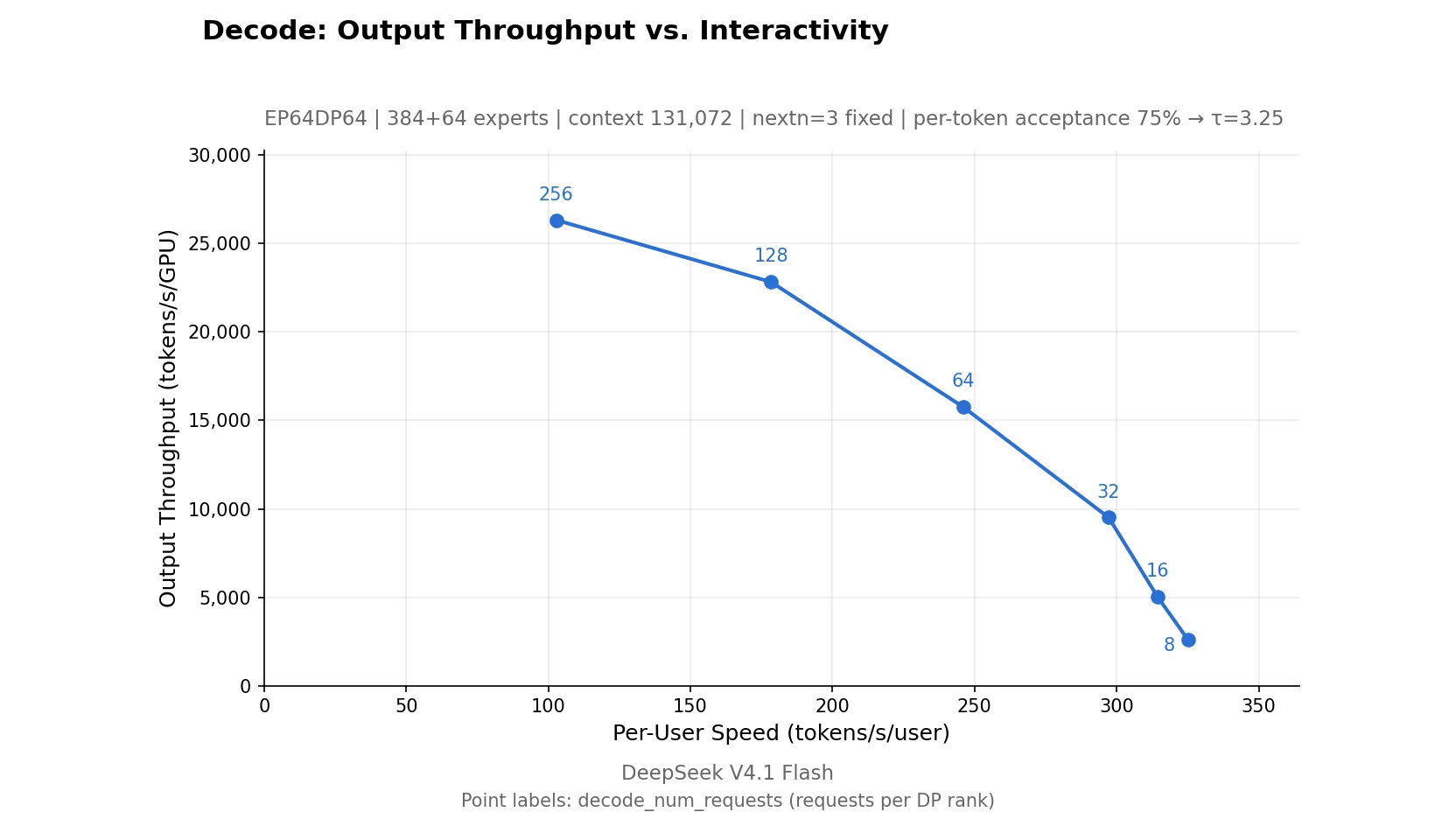
The DeepInfer README includes a decode performance curve measured on 64 SM100 GPUs.
Source: DeepSeek / DeepInfer.
I read three points off the chart:
| Concurrent requests per GPU | Tokens/sec per user | Output tokens/sec per GPU |
|---|---|---|
| 8 | ~325 | ~2,600 |
| 64 | ~246 | ~15,700 |
| 256 | ~103 | ~26,400 |
Going from 8 concurrent requests to 256 increases per-GPU throughput by roughly 10x, while per-user speed drops to about a third. Providers calculate cost based on per-GPU output, whereas users judge speed by how fast words appear on screen. Where a platform sits on this curve is a trade-off between price and experience. These numbers come from offline benchmarks and are scaled using an assumed speculative decoding acceptance rate, so they only show the trend—they should not be compared directly against live API speeds.
The engine’s job is to push that entire curve outward. Speculative decoding is one example: quickly drafting a few tokens and having the main model verify them in one pass, keeping whatever matches. Both llama.cpp and vLLM support this. DeepInfer differs by varying the verification length dynamically, allocating it each round based on “expected accepted tokens per millisecond” so drafts unlikely to be accepted get checked less. According to the Zhihu post, with 5 draft tokens generated per step, switching to variable-length verification improved production throughput by 6% over fixed 5-token verification.
A few percentage points barely matter on a single desktop, but across clusters of dozens or hundreds of GPUs, that is real money. The official post notes that a single DeepSeek cluster serves 155 trillion tokens per day and brings in $38 per GPU-hour even at off-peak pricing.
What recipe Fills In: Translation Before and After the Model
Models do not understand JSON. The messages and tools you send in an API call must first be assembled into a sequence of tokens with control markers that the model can read. Likewise, the tokens the model emits have to be parsed back into thinking content, final answers, and tool calls.
Anyone who has run models locally has dealt with this layer. llama.cpp reads chat templates embedded in GGUF files, while vLLM relies on chat templates paired with dedicated reasoning and tool-call parsers. Because the V4.1-Flash checkpoint does not ship with a standard Jinja template, vLLM had to add a custom deepseek_v41 tokenizer mode and two parsers, and that llama.cpp PR also has to supply its own template.
recipe is DeepSeek’s official implementation of this layer, written in Rust with Python bindings. It supports three request formats: OpenAI Chat Completions, OpenAI Responses, and Anthropic Messages. In the Zhihu post, DeepSeek states that its logic aligns completely with the official API so third-party deployments can deliver the same API behavior. If this layer is wrong, the model won’t crash—it will just behave weirdly, leaking reasoning into the answer or failing to parse tool calls.
I ran a quick check with recipe. Using a user message containing a<|User|>, I ran the same conversation down two paths: encoding via the structured conversation API produced 1 control token for <|User|>, whereas rendering the conversation into a single string first and tokenizing with the full vocabulary produced 2.
That extra occurrence came from the literal characters typed by the user. recipe tracks which control tokens were inserted by the template and treats everything else as plain text. If you render to a string and re-tokenize, that boundary information is lost, and the user’s text gets treated as a message delimiter. That is why the recipe documentation explicitly warns that rendered prompt strings are for inspection only and must not be re-encoded.
These literals show up in normal workloads. When an Agent reads recipe’s source code or an article about DeepSeek chat templates, tool outputs are full of strings like this. The official post confirms that matching strings inside user inputs, tool outputs, and tool arguments are all encoded as plain text. The output side works the same way: I constructed a plain-text </think> sequence, and recipe kept it separate from the real end-of-thinking control token. A backend that decodes tokens into text before parsing cannot tell the two apart.

What Was Not Released
DeepInfer only includes example scripts for offline inference—there is no HTTP server. Nothing here corresponds to vLLM’s vllm serve or llama.cpp’s llama-server. Even the two example servers bundled with recipe use dummy data for the inference step.
The README explicitly lists three more pieces needed for a complete online service: a KV cache system, disaggregated deployment that splits vision encoding, prefill, and decode across different machines, and load balancing across those machines.
We have covered KV caching before: it stores intermediate computation from a conversation so cache hits skip recomputing from scratch. According to the Zhihu post, DeepSeek stores it on roughly 100 PiB of SSDs in production, keeping Agent traffic cached for 3 days and chatbot traffic for 7 days. Nor does the hardware topology fit inside a single server: prefill runs on standard 8-GPU nodes, while decode runs on supernodes of 64 to 128 GPUs.
The official post explains that KV cache management and load balancing are deeply tied to internal infrastructure, so that code is not fully open-sourced yet—the exact same second concern from the 2025 note.
DeepInfer shows how DeepSeek saturates a cluster; if you want to run this model on your own hardware, you still need vLLM, llama.cpp, or MLX.
Choosing Based on Your Hardware
- Just a Mac or a gaming GPU: DeepInfer won’t help. Wait for the llama.cpp or MLX community ports, and check your RAM before downloading—even 4-bit quantization needs around 380GB.
- An 8-GPU H200 server: Use vLLM; the official deployment guide has ready-to-run launch commands.
- A B200 or Ascend 950 cluster running only this model where per-GPU throughput matters: DeepInfer is worth trying, though you will need to build the HTTP server, caching, and request routing yourself.
- Building a model gateway or Agent backend:
recipeis usable right now. Even if you don’t adopt it directly, use it to cross-check your own templates and parsers—starting with that 1-vs-2 token test above.
文中链接
- short notehttps://github.com/deepseek-ai/open-infra-index/blob/main/OpenSourcing_DeepSeek_Inference_Engine/README.md
- DeepInferhttps://github.com/deepseek-ai/DeepInfer
- deepseek-recipehttps://github.com/deepseek-ai/deepseek-recipe
- deployment walkthroughhttps://zhuanlan.zhihu.com/p/2095560295930508953
- official deployment guidehttps://recipes.vllm.ai/deepseek-ai/DeepSeek-V4.1-Flash
- unmerged PRhttps://github.com/ggml-org/llama.cpp/pull/28696
- DeepSeek / DeepInferhttps://github.com/deepseek-ai/DeepInfer/blob/8b16149741a4935e1dec8cea27853f273b374c5b/doc/images/decode_pareto.png
- documentationhttps://github.com/deepseek-ai/deepseek-recipe/blob/935817c66f5d6e64838f419692545f06787e485f/docs/tokenizer.zh.md
Copyright
- Author
- XingKaiXin
- Title
- DeepSeek's Open-Source DeepInfer: How It Differs from vLLM and llama.cpp
- Published
- 2026年10月21日
Licensed under CC BY-NC-ND 4.0 DEED.