

An agent is running a task, and a confirmation dialog pops up: it wants to run a shell command. Allow? I glance at it and click Allow. Two minutes later, another one pops up. Click again. By the end of the afternoon, I realize most of my “allows” didn’t pass through my brain at all—the popup assumes a human is acting as a gatekeeper, when in practice the human is just an auto-confirmer with higher latency.
Yet turning on full auto-accept feels unsettling. What if it deletes the wrong directory or pushes to the wrong branch? I hadn’t figured this out until last week, when I read a post by Sentry engineer Burak Yigit Kaya. Its title is decidedly unglamorous: a £40 box that writes code for him while he’s on the toilet.
He turned on YOLO mode for opencode without a single popup, because there wasn’t much the agent could touch in the first place.
A £40 Box
Burak bought a used Dell OptiPlex 3050 on eBay for £40. He originally meant to flash OpenWRT on it as a router, failed, and shoved it into a drawer. When he moved, he dug it back out, installed Ubuntu Server, ran opencode as a persistent systemd service, and accessed its web UI from his phone over Tailscale.
Later he added RAM, an SSD, and a network card, bringing the total cost close to £100. Still, it’s an old PC he can wipe and reinstall at any time, with no production environment and no secrets worth stealing.
His worst-case estimate: the machine gets trashed, and he spends an afternoon rebuilding it from scratch. That’s a cost he can afford, so everyday commands are all set to auto-accept.
Full Permissions Only Exist Inside That Machine
That box went on to solve a Linux WiFi AP issue that had bothered Burak for nearly twenty years, and took over his home lights too. The riskiest run was when the agent on the machine migrated its own system drive by hand, chatting with him in the web UI the whole time.
A task like that runs a long chain of commands. If every step had to wait for someone to pick up their phone and confirm, an always-on agent would degrade into a sluggish remote terminal.
All Burak handed over was that old Dell. So-called “full permissions” only hold inside that machine. Outside it, those permissions end.

Blast radius, put plainly, is the maximum damage a single mistake can cause. Step-by-step approval relies on a human staying alert every time; Burak simply caps the loss at one machine he can reinstall. The second approach is much easier to verify.
Popups Should Be Reserved for Rare Actions
That doesn’t mean permission popups are useless. Cutting a release, deploying to production, deleting live data—these happen rarely and are hard to undo. They’re worth stopping for human confirmation.
The problem is the other kind of popup: confirming to run tests, confirming to read a file, confirming to run git status. Once alerts turn into background noise, the button is still there, but the review is gone.
A better split is letting the agent run ordinary commands on its own inside an isolated environment, and stopping only when an action crosses a boundary. Approval guards the perimeter instead of blocking every step.
Four Things I Check First Now
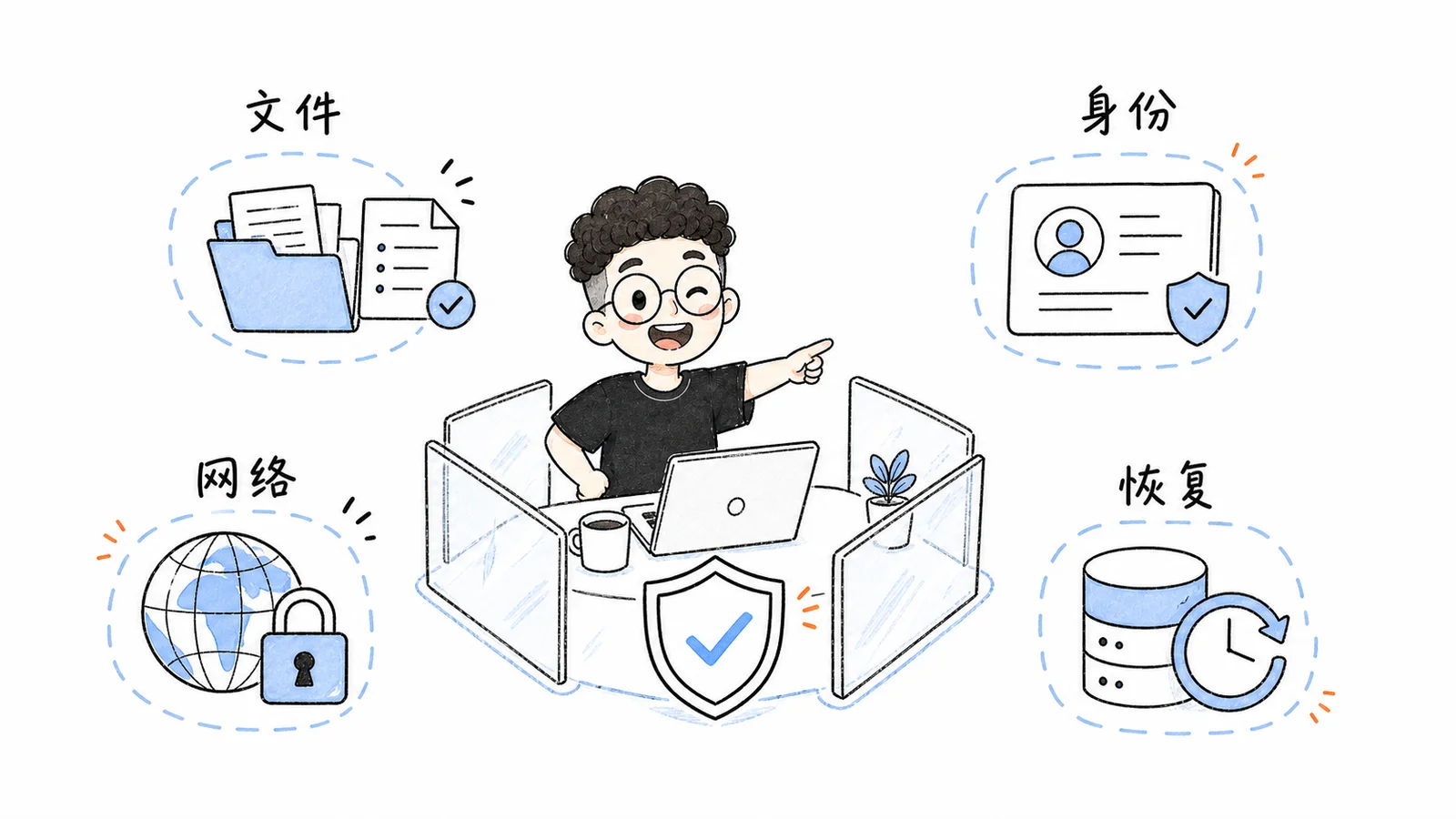
You don’t have to buy a separate computer. Containers, VMs, and disposable cloud instances all work. What matters is settling these four things before starting:
- Files: use a disposable clone, container, or VM—don’t mount your home directory, SSH directory, or Docker socket.
- Identity: provide only short-lived credentials needed for the current task, never production keys; use protected branches on remote repos as a backstop.
- Network: disconnect if network access isn’t needed, or restrict destinations if it is. A separate machine stops accidental host deletion, not an agent calling production APIs with your token.
- Recovery: code has a remote, data has snapshots, and the environment can be rebuilt. Anything unrecoverable doesn’t belong in the auto-execute loop.
Recovery starts with noticing the problem. CI turning red in ten seconds is a different kind of loss from corrupted data discovered ten days later. For tasks where I can’t see the outcome, I don’t let the agent run unattended for long.
Worktrees are still useful, but they only organize Git changes—they aren’t a security boundary. Standing inside a worktree, an agent can still read parent directories, delete other files, and push the wrong branch to remote.
Now when I start a task, I run through files, identity, network, and recovery first. Ordinary commands inside those boundaries can auto-execute; actions that cross them—releasing, deploying, deleting data—keep manual confirmation. If the boundaries aren’t clear, auto-accept stays off.
Clicking “Allow” only proves a human is online; being able to contain a mistake is what proves a boundary actually exists.
文中链接
- a posthttps://byk.im/posts/ultimate-setup-labs/
Copyright
- Author
- XingKaiXin
- Title
- I Stopped Clicking "Allow" on Every Agent Prompt: Security Is About Blast Radius, Not Popups
- Published
- 2026年8月19日
Licensed under CC BY-NC-ND 4.0 DEED.