

Last month I asked an AI to add a feature to a Chrome extension: send selected text on a web page to a sidebar for translation. The requirement was simple: listen for selection changes, grab the text, and pass it to the sidebar component to render.
Once it finished the code, I asked it to add tests. I ran them—all green. Empty selections, duplicate selections, special characters, cross-paragraph selections—all covered. I merged it.
A few days later, using it myself, something felt off. I opened a long page, selected a few paragraphs, and the browser started to stutter. I opened DevTools and saw the selection event firing dozens of times per second, running DOM traversal and message passing every single time, pegging the CPU.
I went back to the code: the AI had wired the handler directly onto selectionchange with no debouncing at all. Then I looked at the tests: every case made a single selection and asserted immediately. The code and the tests shared the exact same assumption: selection events wouldn’t fire at high frequency.
I told it to add a debounce test. It did. I ran it—green. Looking at the test code, though, it simulated “wait 300ms and select again,” not “fire dozens of times within 300ms.” I tried different prompts—“simulate high-frequency triggers,” “simulate a user dragging selections randomly across a long page”—and it wrote all of them. But not a single scenario came from the AI itself. Every one was just my description translated into test code.
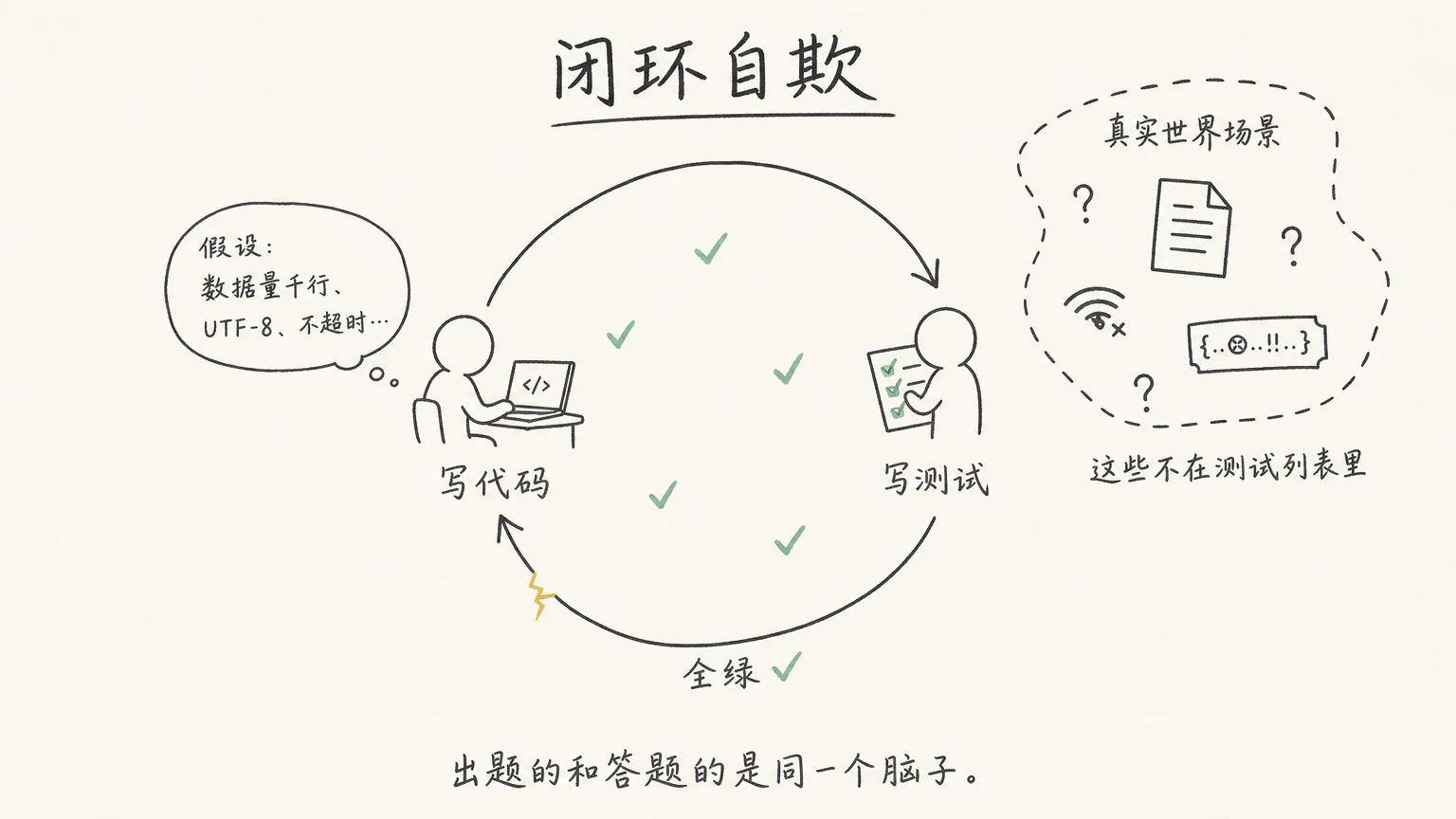
Same Brain Sets the Exam and Takes It
Why are tests useful? Because they bring a different perspective. The person writing the code is thinking, “How do I make this work?” The person writing the tests is thinking, “How do I make this break?” Put those two mindsets side by side on the same logic, and blind spots show up.
When AI writes both the code and the tests, that gap disappears.
While writing code, AI makes a set of hidden assumptions: data stays around a few thousand rows, input is UTF-8, network requests don’t time out, concurrency won’t exceed what a single process can handle. You won’t find these assumptions in comments or docs, and you might not even notice they exist. Yet they dictate every concrete choice in the implementation. Load everything into memory instead of streaming; use synchronous calls instead of an async queue; split strings directly without encoding checks.
Then you say, “Write tests.” The AI builds test cases based on the code it just wrote. It won’t write a test that contradicts its own assumptions, because to it, those assumptions are facts. If the code wasn’t built for 50MB files, large files won’t appear in the tests. If the implementation has no timeout handling, the tests won’t simulate network drops. If the code is single-threaded, concurrency isn’t even on its radar.
The same brain sets the exam and takes it. All-green tests only prove the AI didn’t contradict itself—nothing else.
Coverage Is a Smoke Screen
What makes people drop their guard even faster is the coverage number.
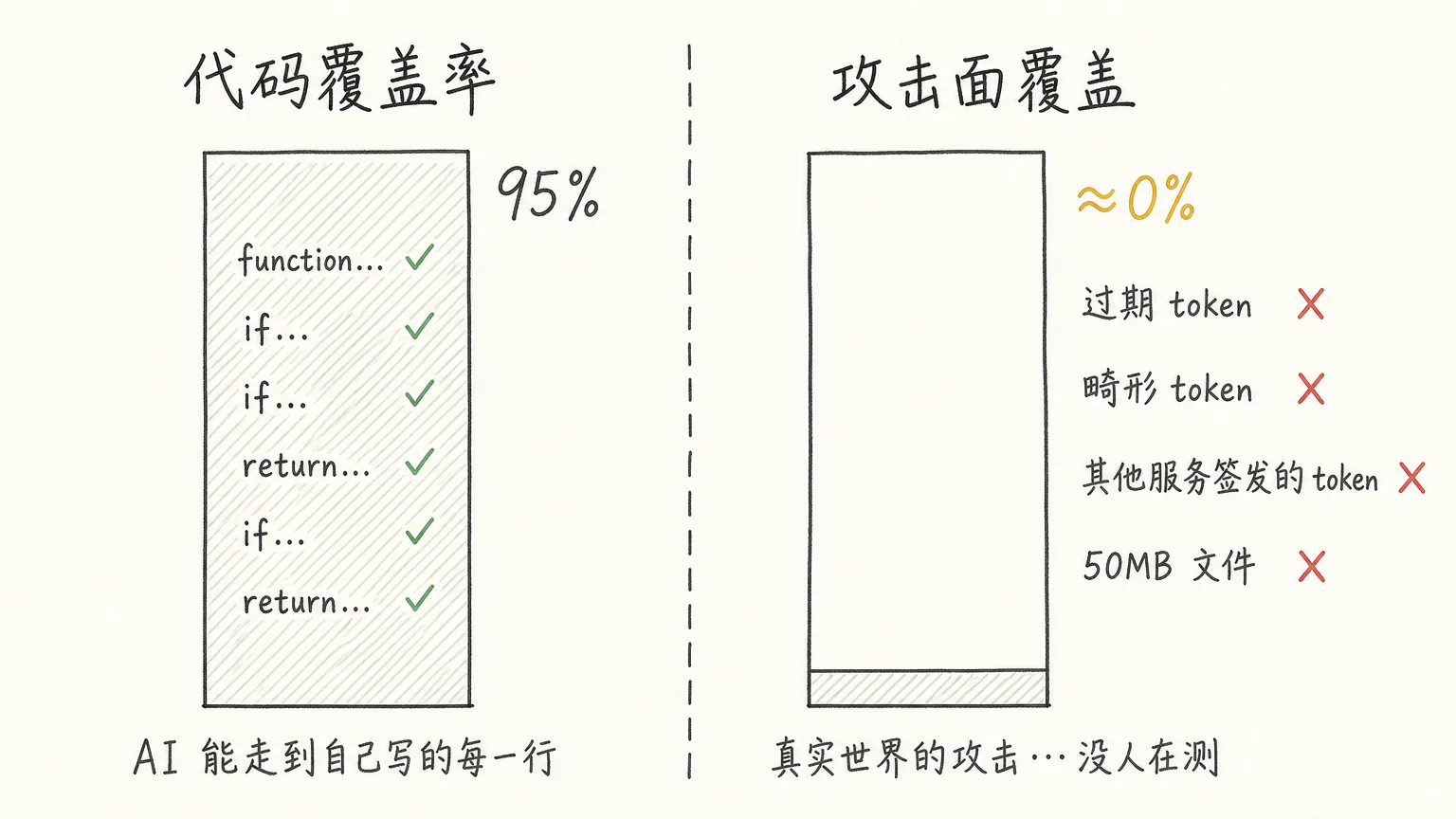
89% looks reassuring. But coverage only measures how many lines of code were executed during tests. It says nothing about how many real-world scenarios were covered. A line being hit only means it ran under the specific inputs the AI invented.
AI is remarkably good at gaming this metric. It knows every branch and conditional in the code, so it can craft inputs that hit every line with precision. You end up with a flattering number, but every path executed is one it anticipated—not a single one worked backward from your actual business scenarios.
I once saw an auth module with 95% coverage where every test token was valid and well-formed. Not one test used an expired token, a malformed token, or a token signed by another service. 95% code coverage, 0% attack-surface coverage.
AI can hit every line it wrote. What it can’t do is step outside and invent scenarios it never thought of.
The False Comfort of Green Lights
32 tests, all green. A solid green progress bar, 89% coverage.
I’ll admit my own guard drops a notch when I see that screen. Green is a powerful visual signal—it says “safe.” Even when I intend to keep reviewing, my mental state shifts from “still looking for bugs” to “already verified.”
There’s a cognitive trap here. Those tests really are “correct.” A test claiming to check empty files does check empty files; one claiming to check malformed input does check malformed input. Each one does exactly what it says on the tin. You can’t fault any of them.
But what a test does and what it never thought to do are two different things. Blind spots are never on the test list. Looking at a row of green checkmarks, you simply don’t ask: besides what’s on this list, what’s missing from it?
Breaking the Loop
You wouldn’t let the same person write an exam, take it, and use the score as proof they mastered the material. Exams work because of the knowledge asymmetry between the author and the test-taker. The author knows where mistakes happen; the test-taker doesn’t.
When AI writes both code and tests, it plays student and examiner at once. Its tests answer only one question: “Does the code run the way I think it should?” Whether the code can survive in the real world goes unasked.
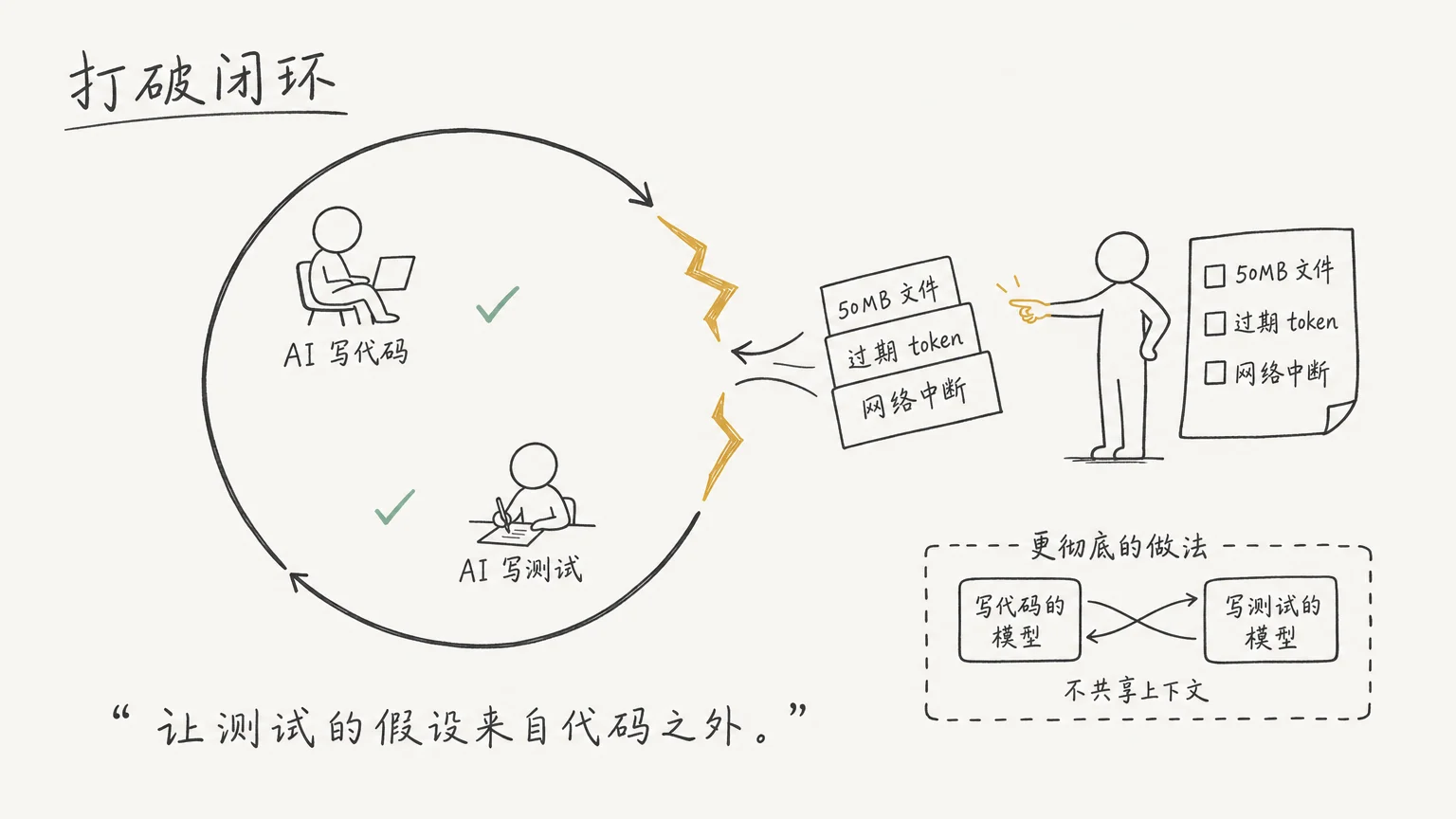
There is only one way to break this loop: the assumptions behind the tests must come from outside the code. My approach now is that I define the scenarios, and AI just turns them into runnable test code. I tell it: test imports with a 50MB file, test auth with an expired token, simulate a network drop halfway through an import. These scenarios come from bugs I’ve hit and my understanding of the business—AI has no idea what those pitfalls look like. Now the two sets of assumptions are no longer the same.
Beyond testing, you can also review the implementation against five checkpoints for accepting AI code—boundary conditions, error handling, external dependencies, state consistency, and permissions.
To go even further—I haven’t gone this far myself yet—don’t share context between the model writing the code and the model writing the tests. The test-writing model doesn’t know what assumptions the coding model made, so it has to reason from the requirements alone about what could go wrong. It won’t catch everything, but at least it’s not grading its own homework.
Back to the story at the start: after fixing the module, I added a test that runs rapid consecutive selections in a browser with over twenty tabs open. The AI didn’t come up with that scenario. Lagging out my own browser taught me that one.
Next time your tests are all green, glance at the test list and ask one question: did these scenarios come from the AI reasoning about its own code, or from you reasoning about your own system?
If they all came from the first, 32 green checkmarks prove nothing.
Copyright
- Author
- XingKaiXin
- Title
- All Your AI-Written Tests Are Green? You're Fooling Yourself
- Published
- 2026年6月4日
Licensed under CC BY-NC-ND 4.0 DEED.